
Mobile access included with CoB
Childcare Booking App for Parents
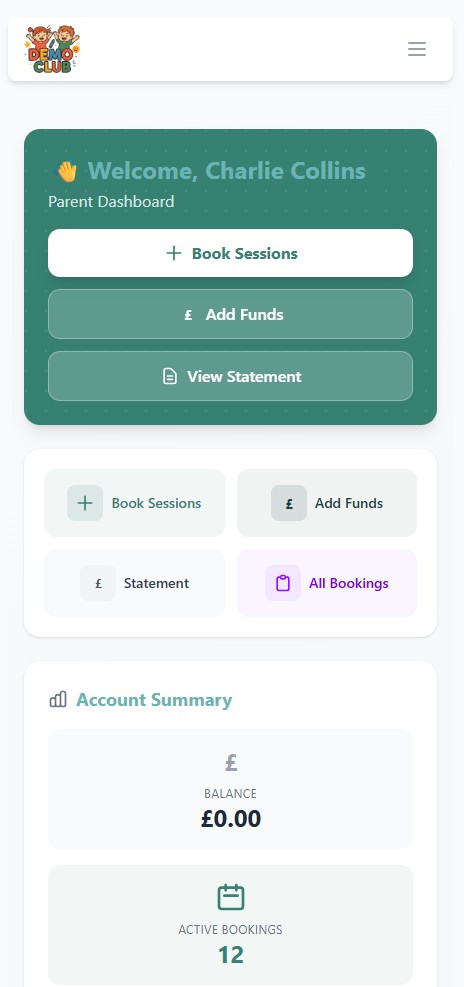
Give parents a quick, convenient way to book childcare, make payments, manage their account and receive important updates — directly from their phone.
The parent app is connected to the complete Childcare Online Booking platform, so mobile activity feeds into the bookings, registers, accounts and information your team already uses.
Access from supported Apple and Android devices
Built around real family routines
Childcare bookings that fit around busy family life
Parents should not have to telephone during opening hours, send booking requests by email or contact staff simply to check which sessions they have booked. The CoB parent app gives them direct access to the everyday parts of their childcare account.
That self-service experience is useful for parents and practical for providers: fewer routine requests arrive with your team, while booking information remains connected to the same CoB system.
Instead of another call or email
- View current and available childcare bookings
- Check account balances and statements
- Add relevant information to a booking
- Receive important updates on registered devices
Mobile bookings
Book childcare from a phone in seconds
Parents can view available sessions, select the childcare they need and make a booking from their phone. They can review existing bookings and cancel an eligible booking where your rules allow it.
This works well for regular and ad-hoc breakfast club, after-school club, wraparound care and holiday club bookings. Parents get convenient access without taking operational control away from the setting.
- View available childcare sessions
- Select, make and review bookings
- Cancel eligible bookings where permitted
- Add notes against relevant bookings
01
Booking notes
Important information reaches the register
Parents can add a note to an individual booking from the booking summary. That note is then shown to staff on the relevant daily register, keeping the information with the session it relates to rather than buried in a separate email or telephone message.
A note can also be copied across selected bookings when the same relevant information applies to more than one date.
Keep safeguarding procedures clear
Booking notes support practical communication; they do not replace your setting’s safeguarding, emergency or formal change-of-collection procedures.
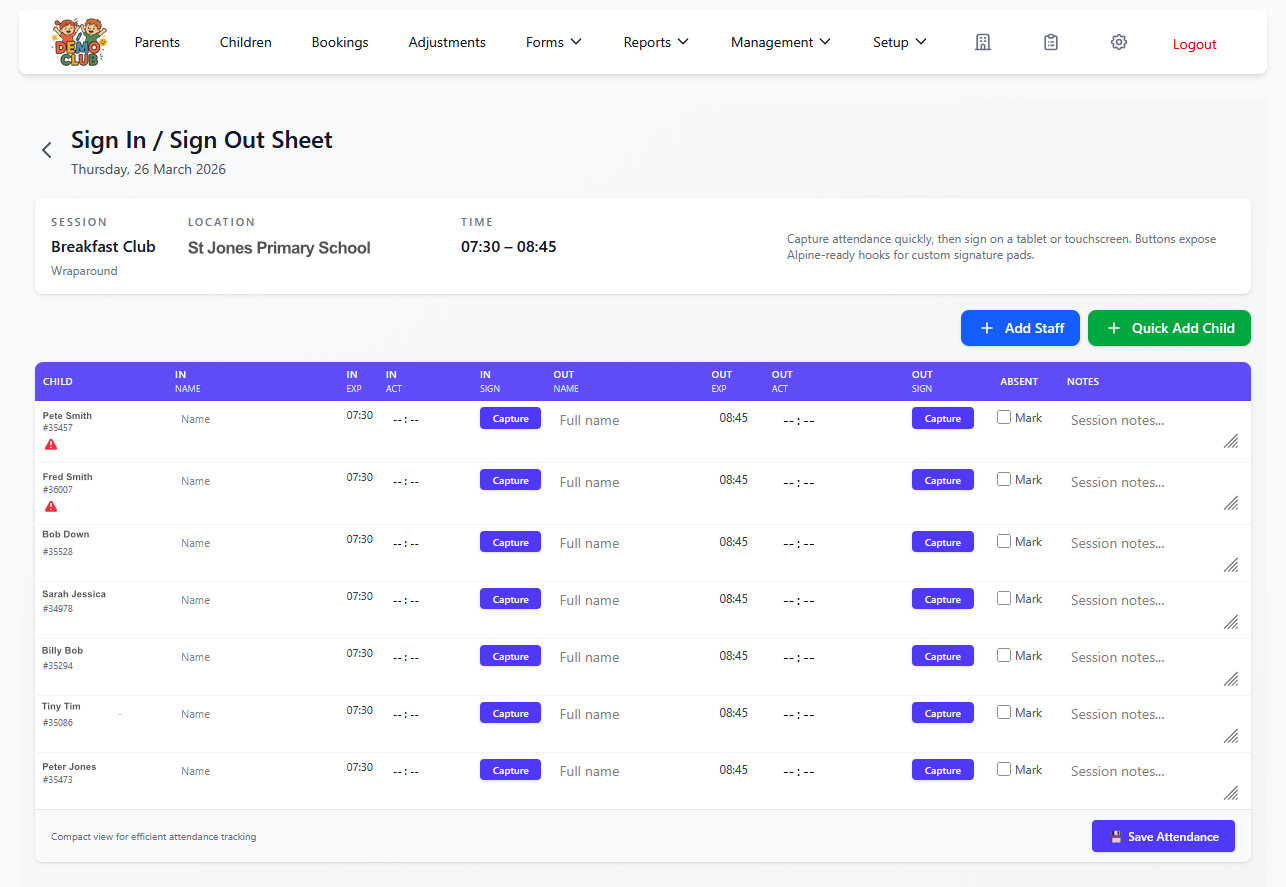
The daily register is where booking-specific information becomes useful to staff.
Push notifications
Keep parents informed with useful updates
Parents can enable push notifications on their registered devices. The app can then provide booking confirmations, messages from the childcare setting and updates when a child is signed in or signed out.
Parents gain greater visibility over everyday activity. Providers gain a direct way to share relevant information without relying entirely on email.
Parents can access the app on several supported Apple and Android devices, and each registered device can receive notifications.
Booking confirmations
Confirm that childcare has been booked.
Setting messages
Receive relevant messages sent by the provider.
Child signed in
Get an update when attendance is recorded.
Child signed out
Receive a sign-out update on registered devices.
One connected workflow
From the register to the parent’s phone
The parent app is not a separate bolt-on. A mobile booking enters CoB and becomes part of the provider’s day-to-day administration.
- 1Parent booksA session is selected in the app.
- 2Booking enters CoBThe same booking is available to the provider.
- 3Register updatesDaily attendance information reflects bookings.
- 4Child is signed in or outStaff record attendance in CoB.
- 5Parent receives an updateA registered device can receive the notification.
Accounts and parent information
Book, pay and manage childcare accounts in one place
Give parents appropriate self-service access to the routine account and contact tasks that otherwise create extra enquiries for your team.
Payments & statements
Clearer account access for parents
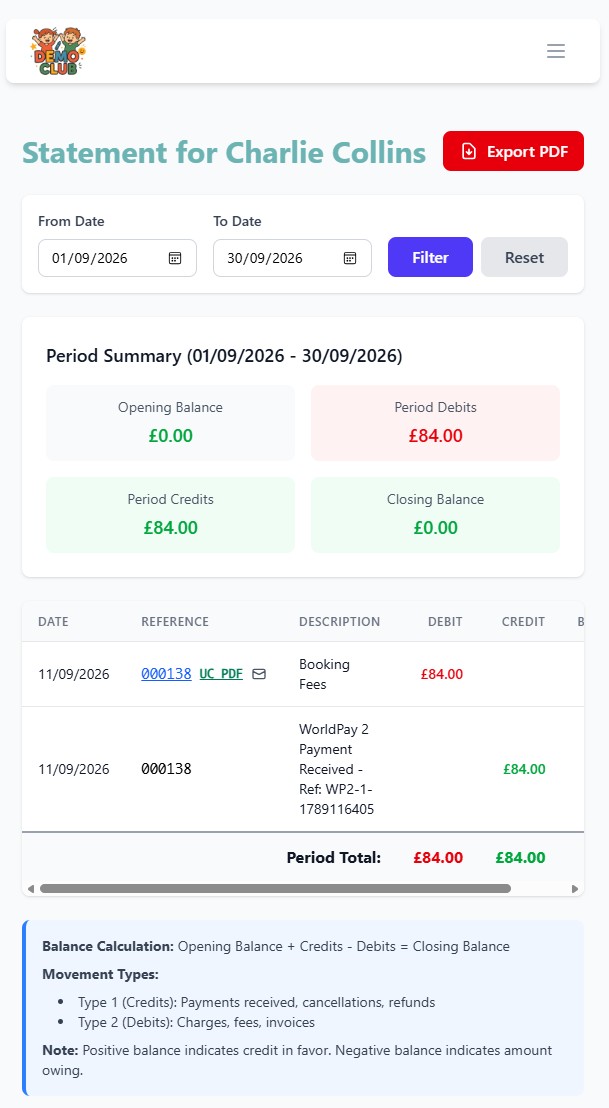
Parents can make online payments, add funds, review their statement balance, access statements and resend invoices from their account.
- Make online payments
- Add funds and review balances
- View statements and resend invoices
Contacts & collectors
Keep important parent information up to date
Parents can add or edit emergency contacts and manage authorised collectors, helping the setting receive appropriate updates without repeated manual data entry.
- Add and edit emergency contacts
- Manage authorised collectors
- Keep relevant account information current
These tools support accurate day-to-day information; they do not create a broad compliance guarantee.
Designed for providers too
A better parent experience means less administration for your team
When parents can handle everyday tasks themselves, your staff spend less time relaying information between calls, inboxes, spreadsheets and registers.
Explore all Childcare Online Booking featuresFewer manual requests
Parents make and review bookings without staff re-entering each request.
Fewer routine account enquiries
Balances, statements and invoices remain available in the parent account.
Current register information
Bookings and relevant booking notes feed into the operational view used by staff.
More structured communication
Confirmations and provider messages reach registered devices through the app.
Flexible across your provision
One parent app for different types of childcare
The same mobile experience supports families while each setting controls its own sessions, availability and booking rules.
After-school clubsRegular or ad-hoc afternoon bookings from a phone.
Breakfast clubsSimple access for recurring morning childcare.
Wraparound careMorning and afternoon sessions through one parent account.
Holiday clubsSelect, book and pay for available holiday sessions.
NurseriesParent account access connected with wider CoB administration.
SchoolsA dedicated childcare booking route that reduces school-office tasks.
The parent experience
See what parents can manage in the CoB app
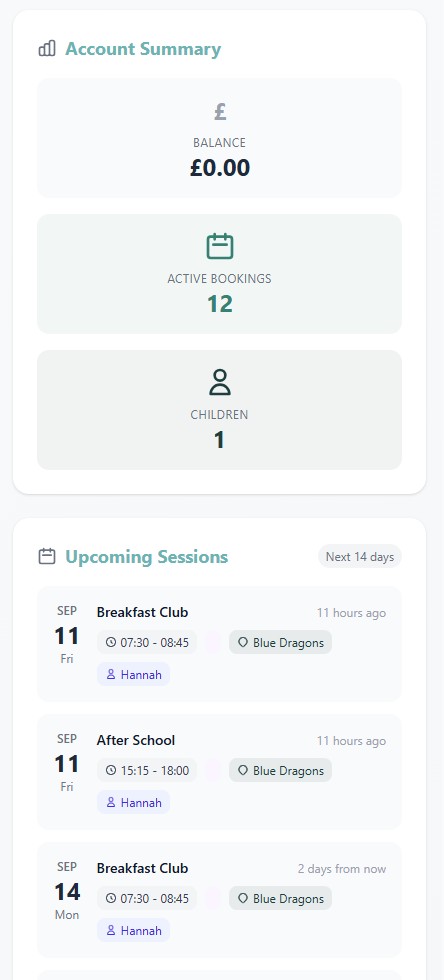
From upcoming childcare sessions to account balances and payment statements, parents can see the information they need in one place. Explore the app screens alongside the everyday tasks below.
Available sessions
Select childcare and make a booking.
Booking summary
Review bookings, cancellations and notes.
Payments & statements
Manage funds, balances, statements and invoices.
Contacts & collectors
Update emergency contacts and authorised collectors.
Notification settings
Enable confirmations, messages and attendance updates.
Provider experience
What easier parent access means in practice
Accurate excerpts from customer testimonials published on the existing Childcare Online Booking website.
Read more customer testimonialsIt has saved time, money and reduced the amount of bad payers. Parents love the flexibility the system offers and the fact they can see what they have booked and paid for.
CoB reduced the workload by approximately 5 hours per week – we employed someone to book, invoice and collect income, which has now reduced to reconciling childcare vouchers only against COB which takes about 20 minutes.
Parent app FAQs
Questions childcare providers ask
Need to see a particular parent workflow?
Request a free CoB demoIs there a childcare booking app for parents?
Yes. The CoB parent app lets parents manage childcare bookings, payments, statements, account information and notifications from supported Apple and Android devices.
What can parents do in the CoB app?
Parents can make and review bookings, make online payments, add funds, access statements, resend invoices, add booking notes, update emergency contacts and authorised collectors, and enable push notifications.
Can parents make and cancel childcare bookings?
Parents can make and review bookings in the app. They can cancel eligible bookings where the childcare provider’s configured rules permit it.
Can parents make payments through the app?
Yes. Parents can make online payments, add funds, review their statement balance, access statements and resend invoices.
Does the app send childcare notifications?
Parents can enable push notifications for booking confirmations, messages from their childcare setting and child sign-in or sign-out updates. Registered devices can receive the enabled notifications.
Can parents add notes to childcare bookings?
Yes. Parents can add a note to a booking and copy it across selected bookings. The note appears to staff on the relevant daily register. Settings should continue to follow their formal safeguarding and emergency procedures.
Does the parent app work on Apple and Android devices?
Yes. Parents can access the app across supported Apple and Android devices, including more than one registered device.
Is the parent app included with Childcare Online Booking?
The parent app forms part of the wider CoB platform rather than operating as a separate booking product. Bookings, account activity, notes and attendance updates connect with the provider’s CoB administration.
See the connected parent experience
Give parents an easier way to manage childcare
See how the parent app works alongside bookings, payments, registers and communication with a free CoB demo.